Smart scales - no cloud, no apps.
Saturday, 24th October 2026
I had a set of Qardio Base 2 smart scales for a few years, and for the most part they worked as expected. You had the scales, the scales talked to the app and the app talked to the cloud. All was well and good as long as you were in their "ecosystem".
However, as the years went on, more gadgets that monitored health metrics of some kind came into my life:- a smartwatch, a peloton bike. So I went in search of the holy-grail; the setup that would give me a single dashboard into my various health metrics. That doesn't seem to exist, though. Every app seems to want to link with Google Health Connect on my pixel phone... But they all want to be the dashboard that I goto. They all want me to login to their app every week!
(That's another rant for another day - why does every fucking thing in the world now require an online account!?)
Rant over! Back to present day. My Qardio scales packed in over 12 months ago now, and I finally got round to replacing them. My main requirements were:- weight (obviously), and body-fat percentage and no "cloud" account or app registration required. I wanted the whole process to run locally on my LAN.
BLE Scale Sync + Renpho Elis 1
After a bit of research I found BLE Scale Sync. This was a great find, as it would connect direct to the scales and could then publish the data to various outputs. As soon as I saw MQTT, Home Assistant and "no phone app required", that pretty much told me I was in the right place. So I headed over to the supported scales section of the docs and started cross-referencing with smart scale products.
Within a few searches I had found a Renpho Elis 1 (ES-CS20M) scale on Amazon. The BLE compatibility page listed this as "The most common protocol; many rebrands", so I was fairly confident they would work - and at £17 they were a LOT cheaper than the previous Qardio Base 2 scales they were replacing. Worth a punt.
When they arrived a few days later, they look perfectly fine and work well. No fuss - just pop in a few batteries and step on, you quickly have a measurement. They are responsive and the screen is big and easy to read.
However, without the app, there is no way to change the built-in display from lbs to Kgs. The app does have a "guest" mode which didn't require any kind of registration though, so that was an OK work-around. I will revisit the initial setup in the future and do a factory reset to confirm that BLE Scale Sync does change the display on the scales.
With the scales powered up and tested, it was time to move onto the link with BLE Scale Sync.
BLE Scale Sync setup
This ended up being really straight forward. After getting some new homelab hardware a few months ago, I have a handfull of Raspberry Pi 5's sitting in a drawer. So I did a fresh image using Raspberry Pi Imager. Selecting the 64 bit Lite variant for a quick headless server, and then ssh'ing into it and doing an sudo apt install docker.io.
After creating an initial empty config file:-
$ touch ./config.yaml
in a slight deviation from the BLE Getting Started Guide, I ran the setup utility as follows:-
docker run --rm -it --network host --cap-add NET_ADMIN --cap-add NET_RAW \
  --group-add "103" -v /var/run/dbus:/var/run/dbus:ro \
  -v ./config.yaml:/app/config.yaml ghcr.io/kristianp26/ble-scale-sync:latest setup
This drops straight into the setup wizard which had no problem using the Bluetooth on the Rapberry Pi, finding my Renopho scales and walking me through setting up user profiles, configuring it to talk to my MQTT broker (and enabling Home Assistant discovery) and saving the config file.
Docker + Systemd conflict
As a bit of a noob to docker and long-running services, I immediately jumped to my trusted setup of "lets make a systemd service for that", and failed to notice that the docker command line I was copying had -d in it, and I didn't realise that specifying --restart unless-stopped meant that the docker daemon would enforce that across entire system reboots... So within a few mins I had systemd respawning docker commands which were also restarting themselves if they failed - and a very unhappy Raspberry Pi! 🤦
So I restarted from scratch, and this time just issued the docker command directly and skipped the systemd site of things. Sure enough, after a hard reboot of the Pi, the docker daemon restarted and re-ran the container for ble-scale-sync.
Up and running
With that little hiccup out the way and everything up and running, I stepped on the scales. Watching the output of docker logs -f my-container-id, I saw the data from the scales in the logs and a few seconds later straight into Home Assistant:-
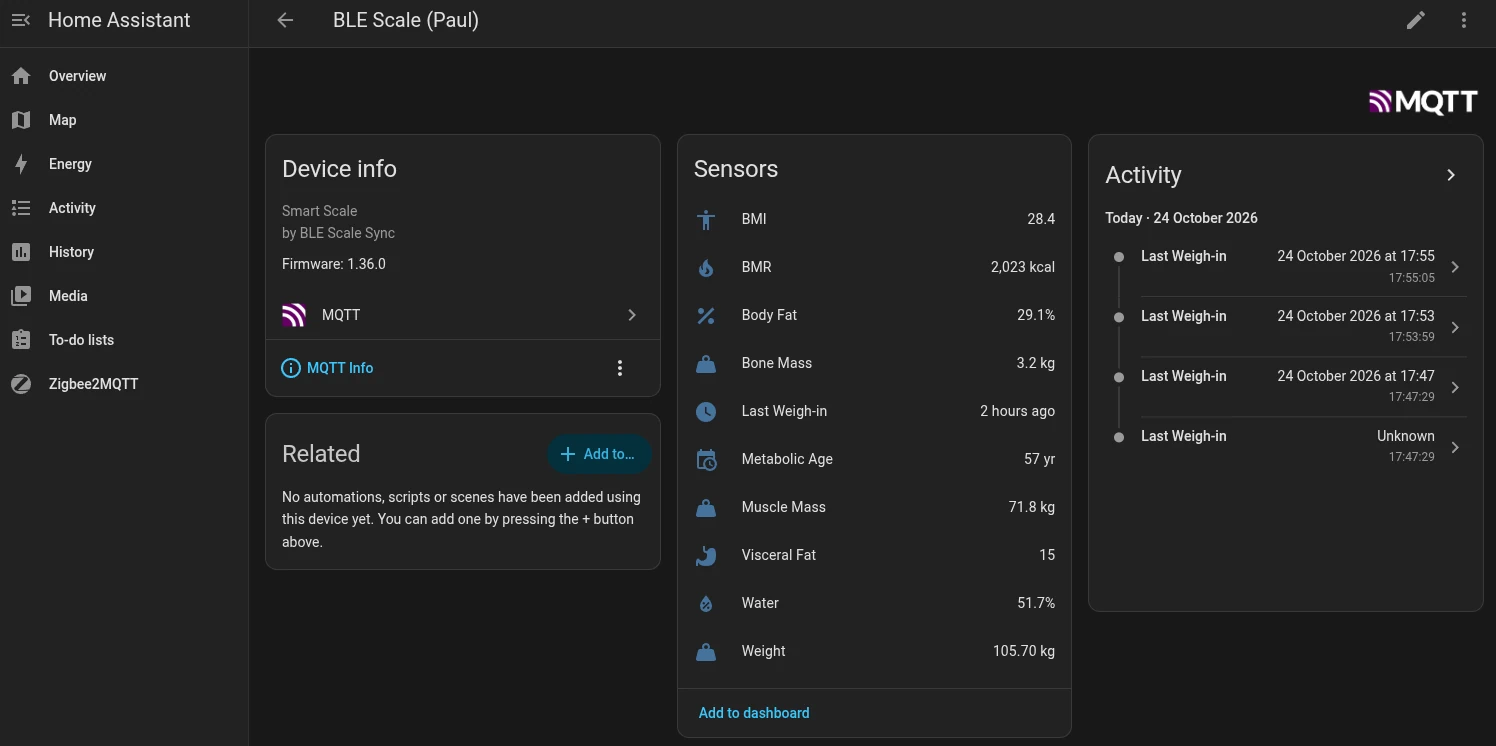
Weight and BMI are probably accurate (yes, I have some serious exercise to do) as I keyed my height into the setup wizard. I'm a bit sceptical about the others at this stage as for this test reading I was wearing shoes!
Conclusion
It's not always this easy to get things up and running "Local first" without "the cloud" or some app - or more annoyingly some account registration - getting in the way. The BLE Scale Sync setup was so seamless though, I dropped them a quick $15 one-off sponsorship on GitHub - nice work from all the project contributors.